Overview
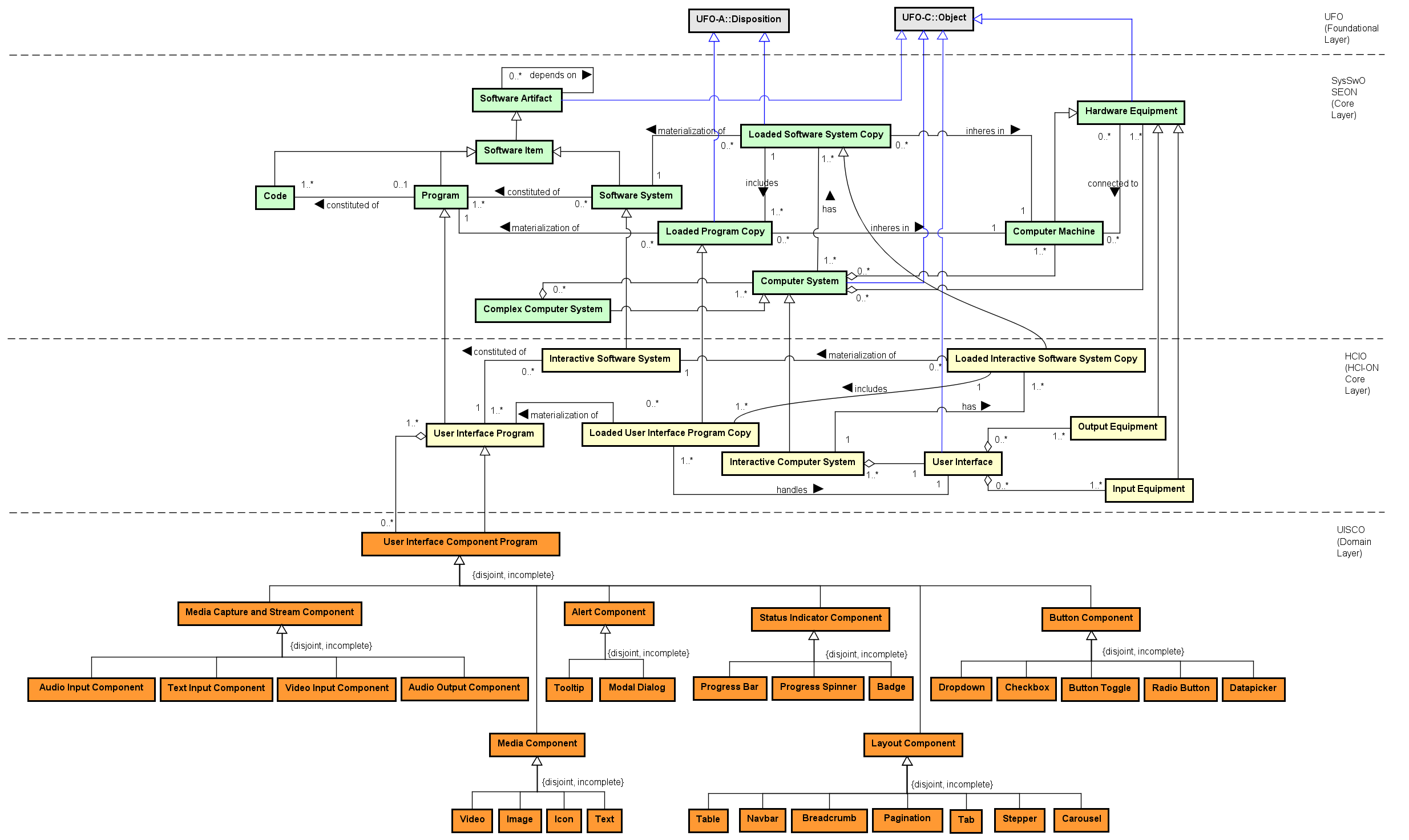
This page presents the UI Software Components Ontology (UISCO): the conceptual model (figure), the main UI component types, example instantiation and a short glossary.
 OObject
CSComputer System
HEHardware Equipment
ICSInteractive Computer System
UIUser Interface
IEInput Equipment
OEOutput Equipment
UISCUser Interface Software Component - root for UI component types
MCMedia Component - Video, Image, Icon, Text
LCLayout Component - Table, Navbar, Breadcrumb, Pagination, Tab, Stepper, Carousel
AC
OObject
CSComputer System
HEHardware Equipment
ICSInteractive Computer System
UIUser Interface
IEInput Equipment
OEOutput Equipment
UISCUser Interface Software Component - root for UI component types
MCMedia Component - Video, Image, Icon, Text
LCLayout Component - Table, Navbar, Breadcrumb, Pagination, Tab, Stepper, Carousel
ACFigure: UI Types and Elements Ontology (UISCO). (Click image to enlarge - click hotspots to jump to concept)
Concepts (UFO - Foundational Layer)
- Object - Non-agentive substantial individuals. Objects can be Physical or Social.
Concepts (SysSwO - Core Layer)
- Computer System - System containing one or more Computer Machines, and other Hardware Equipments connected to them, and associated software systems that are installed/loaded in these Machines (adapted from ISO/IEC/IEEE 24765:2017).
- Hardware Equipment - Physical Object used to process, transform, store, display or transmit information or data. E.g.: Computer Dell I7, Laser Printer HP, Smartphone Galaxy 7, Router Linksys Wi-fi.
Concepts (HCIO - Core Layer)
- Input Equipment - Hardware used for input (e.g., keyboard, mouse, microphone, webcam) that is part of the User Interface and can be present at the Context of Use.
- Interactive Computer System - The computer system that participates in the interaction (may reuse SysSwO/HCIO concepts).
- Output Equipment - Hardware used for output (e.g., display, speaker) that is part of the User Interface and can be present at the Context of Use.
- User Interface - All components (hardware/software) that provide information and controls for the user to accomplish tasks; Input/Output Equipment are parts of the User Interface.
Concepts (UISCO - Domain Layer)
- User Interface Software Component - an entity representing a software component used to build the user interface. It is the root for specializations such as Media, Layout, Form, Alert and Status Indicator Components.
- Media Component - components that render media:
- Video - component for video playback.
- Image - component for static images.
- Icon - graphical icons used in buttons, menus, etc.
- Text - textual content components.
- Layout Component - structural and navigation components:
- Table - tabular data presentation.
- Navbar - main navigation bar.
- Breadcrumb - navigation trail.
- Pagination - list pagination controls.
- Tab - tabbed content containers.
- Stepper - step-by-step flow component.
- Carousel - item/gallery carousel.
- Alert Component - components intended to draw attention or present dialogs:
- Tooltip - contextual hint on hover/focus.
- Modal Dialog - modal dialog for confirmations or forms.
- Form Component - input controls and form elements:
- Text Component - single-line/multi-line text field.
- Password Component - password input field.
- Dropdown - select menu.
- Checkbox - checkbox control.
- Radio Button - radio option control.
- Datepicker - date selection control.
- Button Component - various button types (submit, icon, menu, toggle).
- Status Indicator Component - components to indicate progress/state:
- Progress Bar - linear progress indicator.
- Progress Spinner - circular loading indicator.
- Badge - numeric/visual marker.
- Button Component - button variations used throughout the UI:
- Button Toggle - toggling (on/off) button.
- Submit Button - form submission button.
- Menu Button - opens a contextual menu.
- Icon Button - icon-only button.
- Expand/Collapse Button - controls expanding/collapsing panels.
Instantiation example
Example showing how UISCO components can be instantiated in a system (e.g. an event website).
| Component | Instance |
|---|---|
| Navbar | Main site navigation |
| Carousel | Event banners slider |
| Text Component | Event description block |
| Image | Event cover image |
| Submit Button | Registration form submit |
| Progress Spinner | Loading indicator for async requests |
